macOS 14 or later · $19 once · source free under MIT

The AI assistant that lives in your notch.

Hover the notch, ask anything, get back to work.

Otto 1.1.0 · 13.7 MB · 14 days, every feature, no card.
Uses the Claude API: bring your own Anthropic key, and Anthropic bills your usage. The source stays free to build.

A 52-second tour of Otto.

Why Otto

Claude, right where your eyes already are.

No window to find, no tab to switch to. Otto sits in the one part of your screen you never use, and gets out of the way the moment you're done.

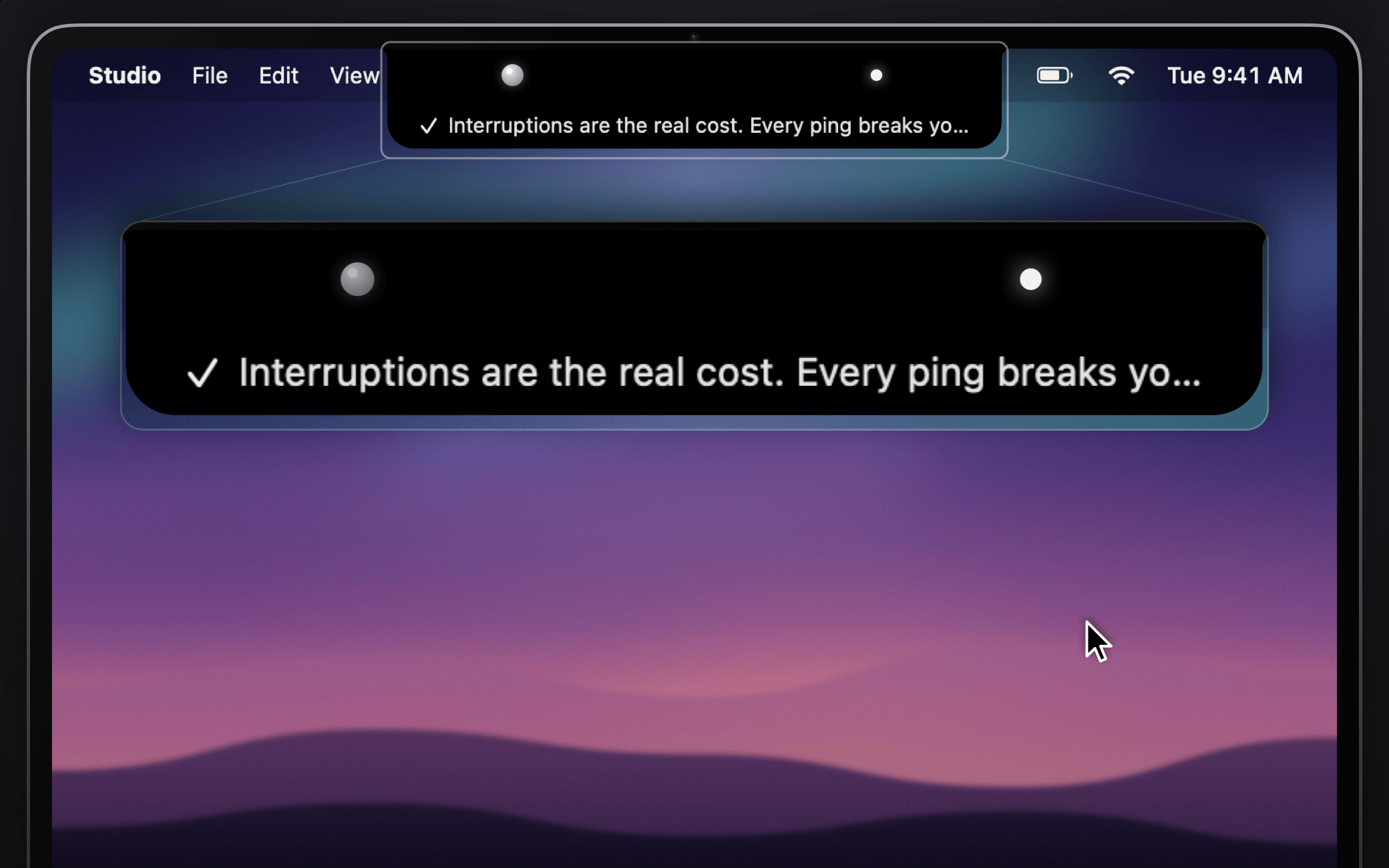
The closed notch after a reply finished: the first line of the answer drops under the camera, shown magnified below

One glance away

Close Otto mid-answer and the reply keeps coming. When it's done, its first line drops under the camera. Rest your pointer on the notch or press ⌥Space, and Otto springs open right below the camera, then tucks itself back into the notch when you move on.

  • Opens on hover, click or ⌥Space
  • Hover the preview to keep it, click it to open the answer
  • No notch? Otto draws one at the top of any display
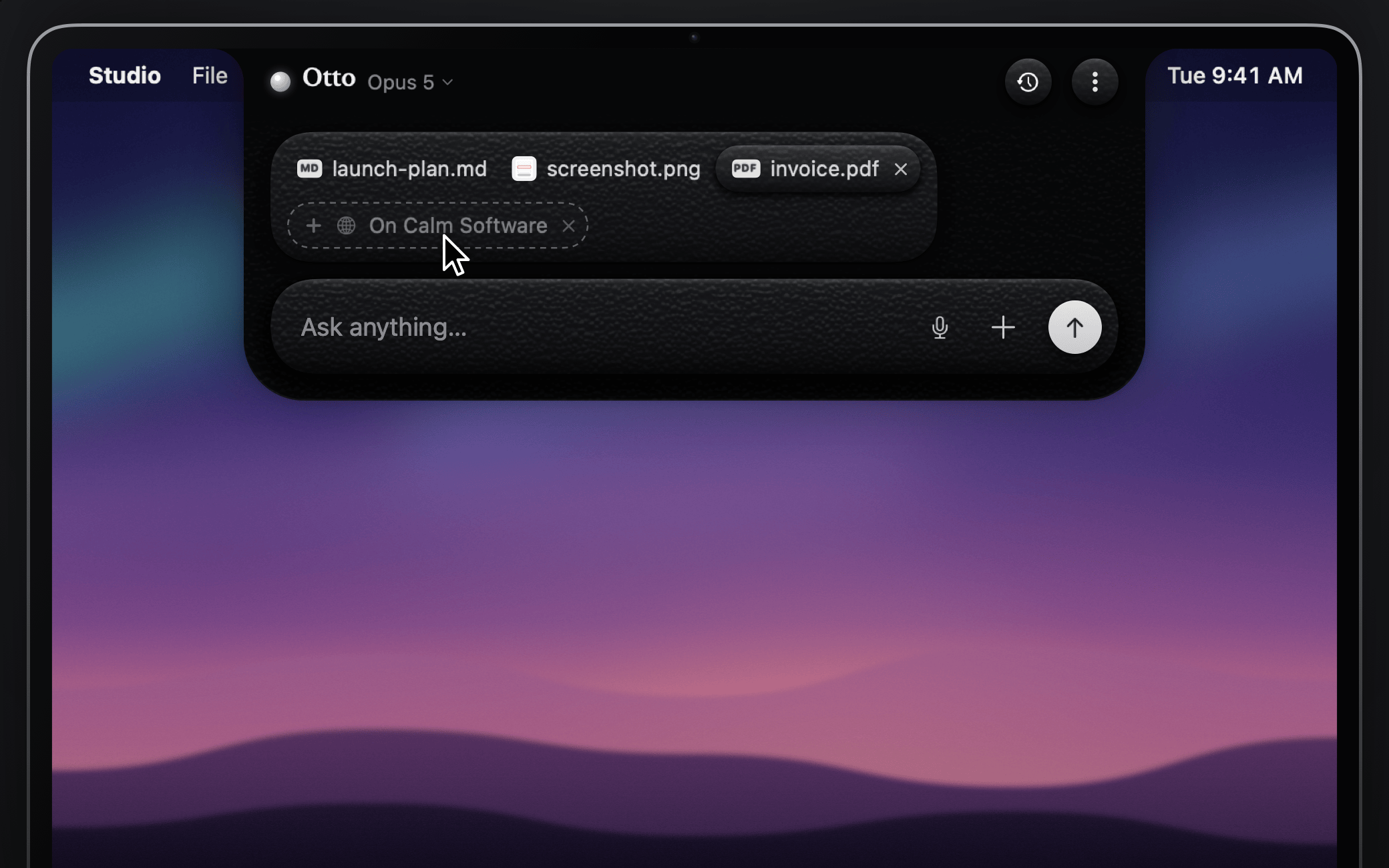
Otto open under the notch with context chips for a browser tab, an image, a PDF and a text file above the composer

Knows what you're looking at

Drop in files, images, PDFs and screenshots, or paste them with ⌘V. Reading something in your browser? Otto offers the tab you're on as a chip. One click and it's part of your question.

  • Drag onto the notch, even while it's closed
  • Capture a screen region from the + menu
  • Works with Safari and Chromium-based browsers
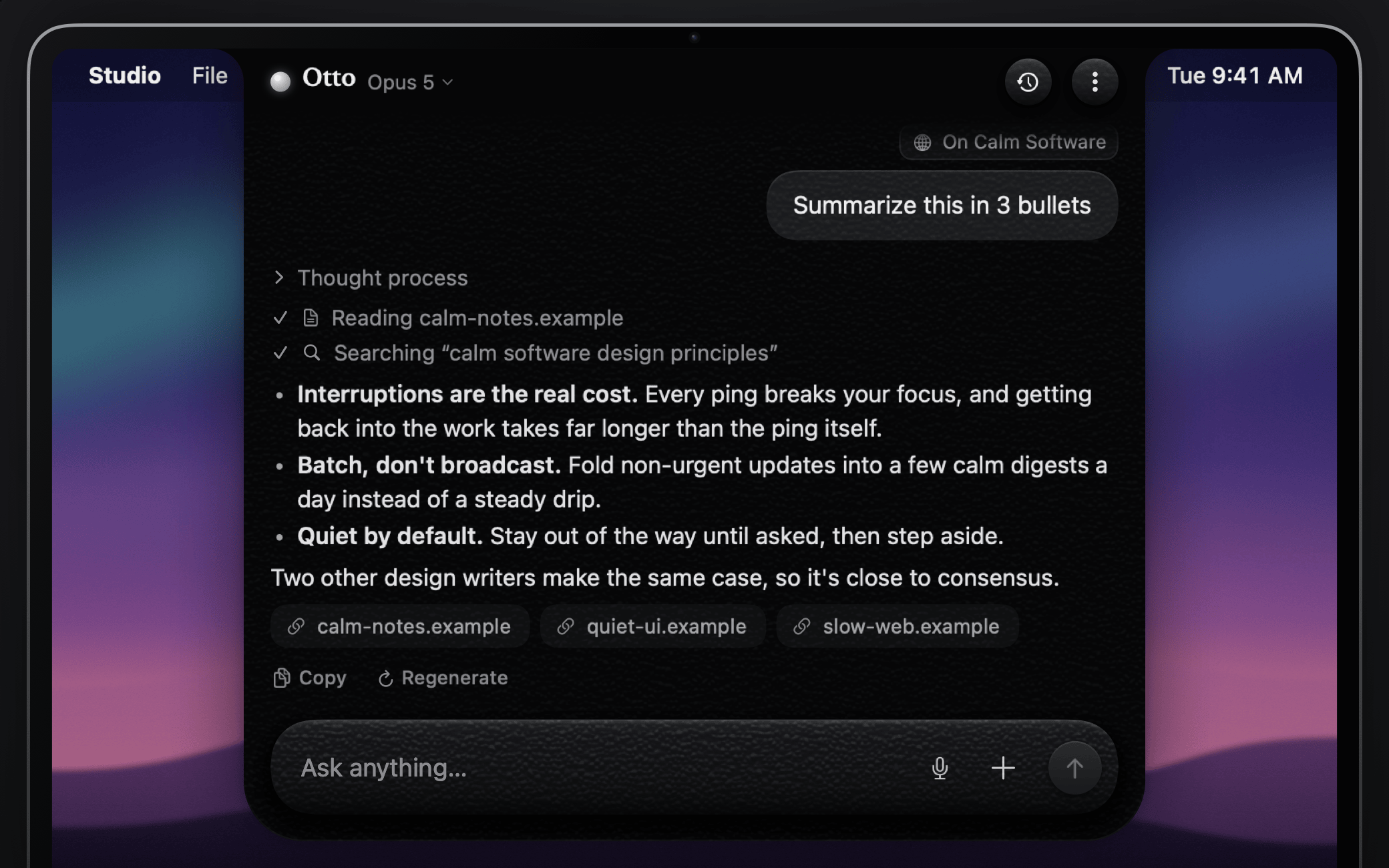
An answer in Otto with the page read and web search it ran, three bullets and source links for each site it used

Answers that stream in

Replies appear as they're written, right in the notch. Otto can search the web and cite its sources, lets you open up its thinking, and renders clean Markdown with code blocks you can copy in one click.

  • Web search with source links
  • Visible thought process
  • Claude Opus 5, Sonnet 5 or Haiku 4.5
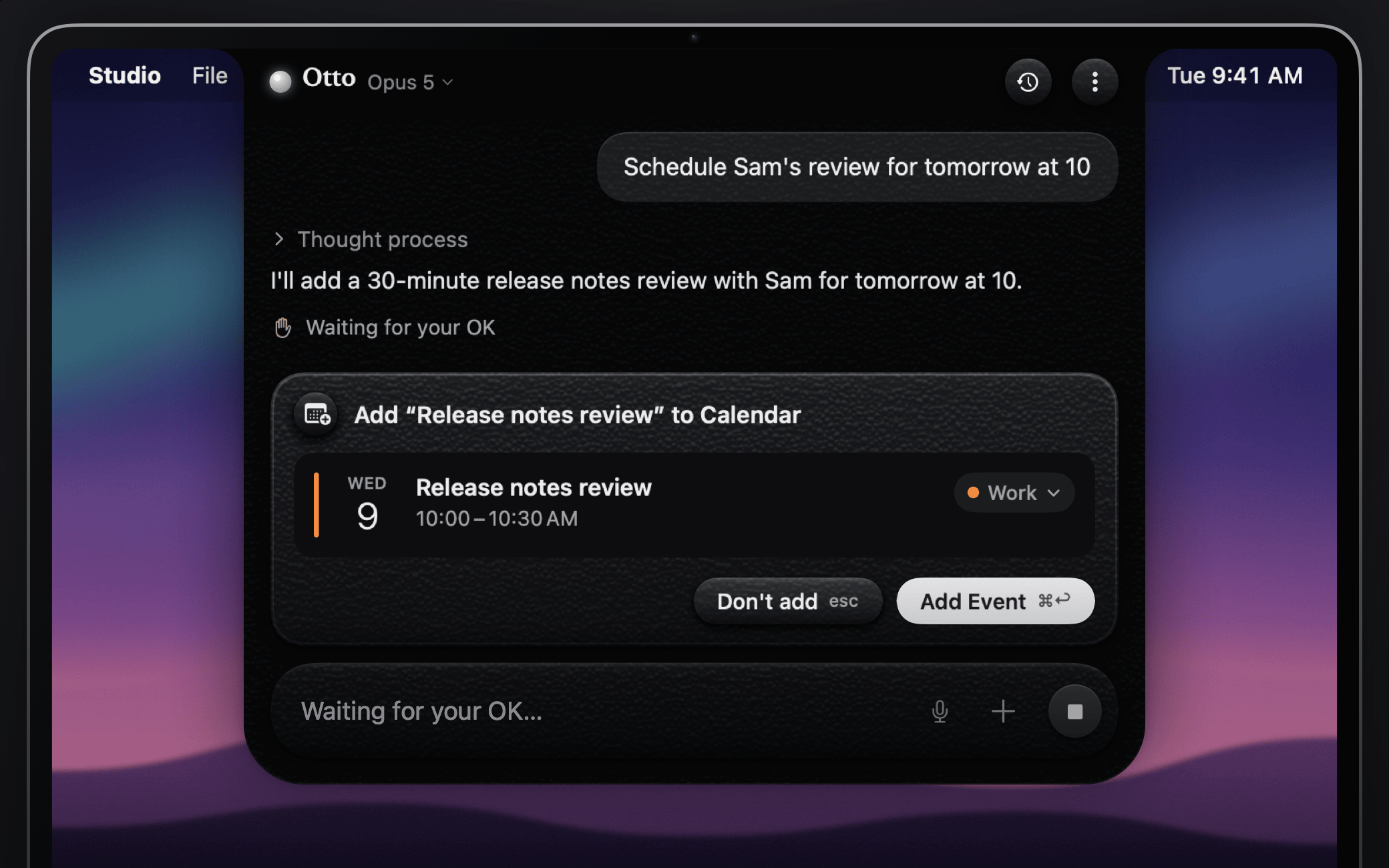
Otto asking before it adds an event: a card for Release notes review, Wednesday 10:00 to 10:30 AM on the Work calendar, with Don't add and Add Event buttons

Acts with your OK

Turn on actions and Claude can add calendar events and reminders, run your Shortcuts or open a link. Each one shows up first as a card with exactly what will be added or run, then waits for your click or ⌘↩.

  • Off until you turn it on in Settings
  • Undo an added event or reminder for 10 minutes
  • A local log of what ran, without its contents
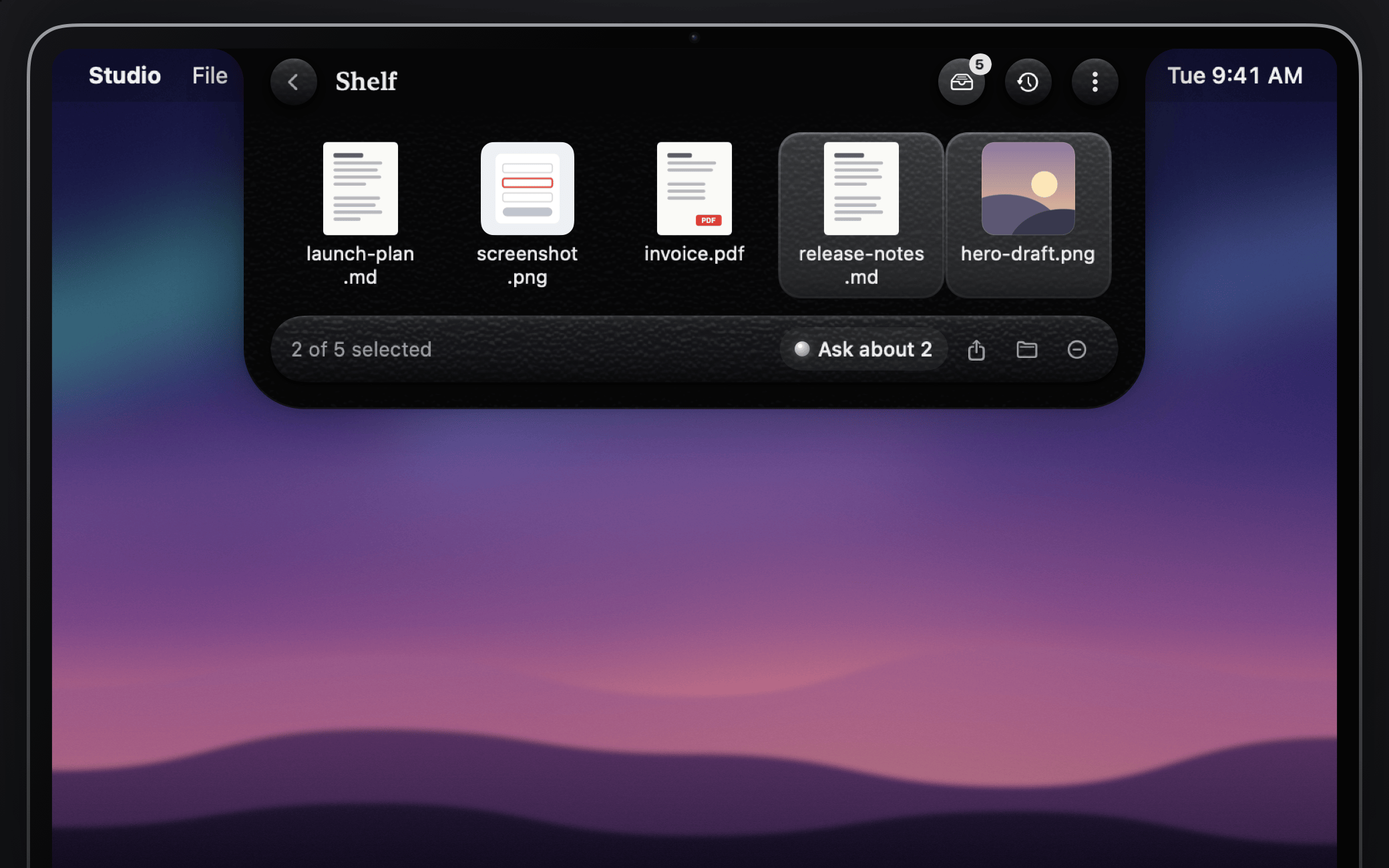
The Shelf under the notch with five files, two of them selected, and Ask about 2 in its bar

Keeps files at hand

Drop files on the left half of the notch to park them on the Shelf. Drag them out into any app, share them, or select a few and ask about them.

  • ⌘D opens the Shelf
  • Keeps a link to each file, never moves the original
  • Up to 50 files
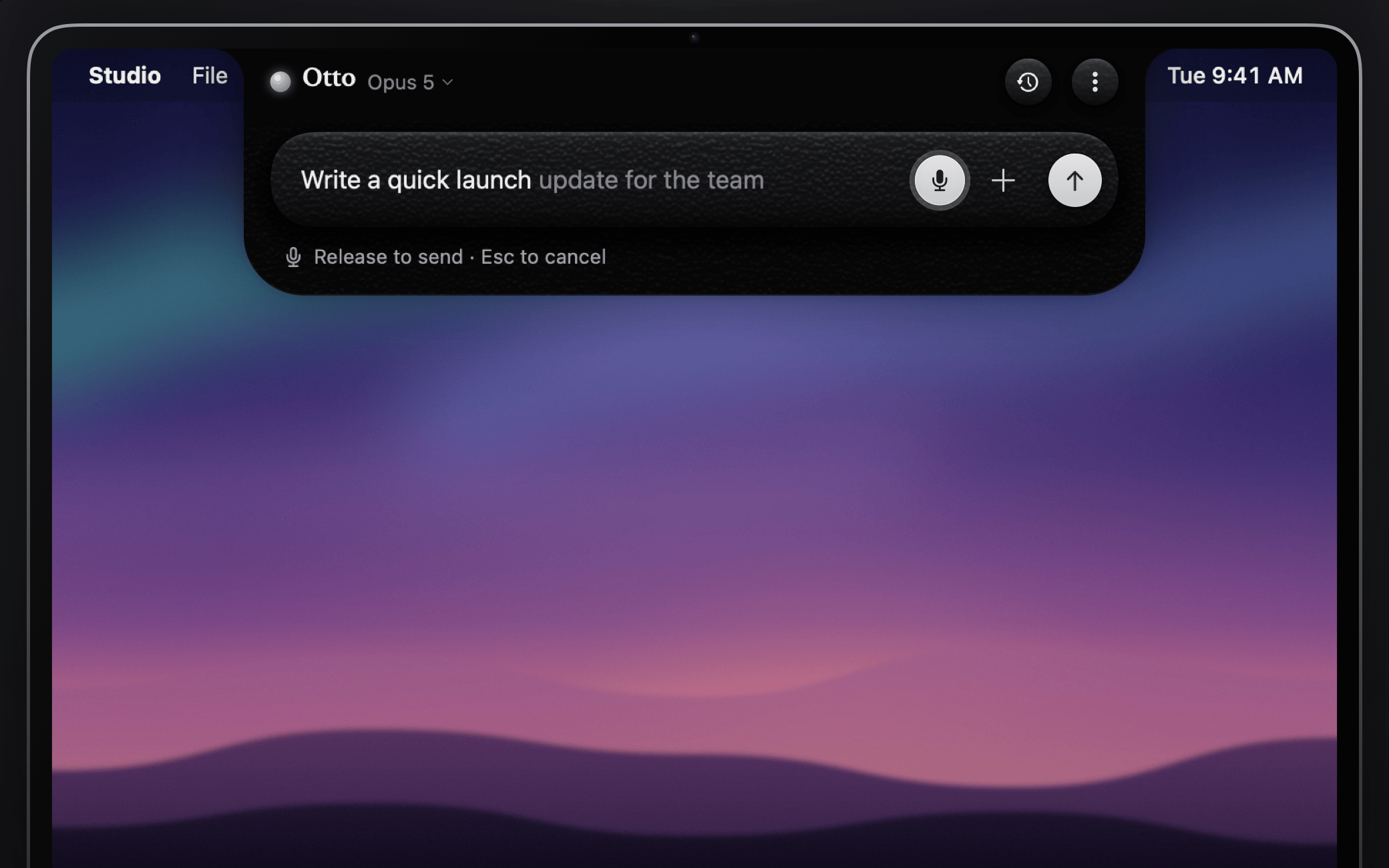
Otto listening: the words Write a quick launch update for the team appear in the composer as they're spoken

Ask out loud

Turn on Voice, then hold ⌥Space and talk. Your words appear in the composer as you speak, and letting go sends them.

  • Speech turns into text on your Mac
  • Or click the mic to start and stop
  • Replies can be read aloud
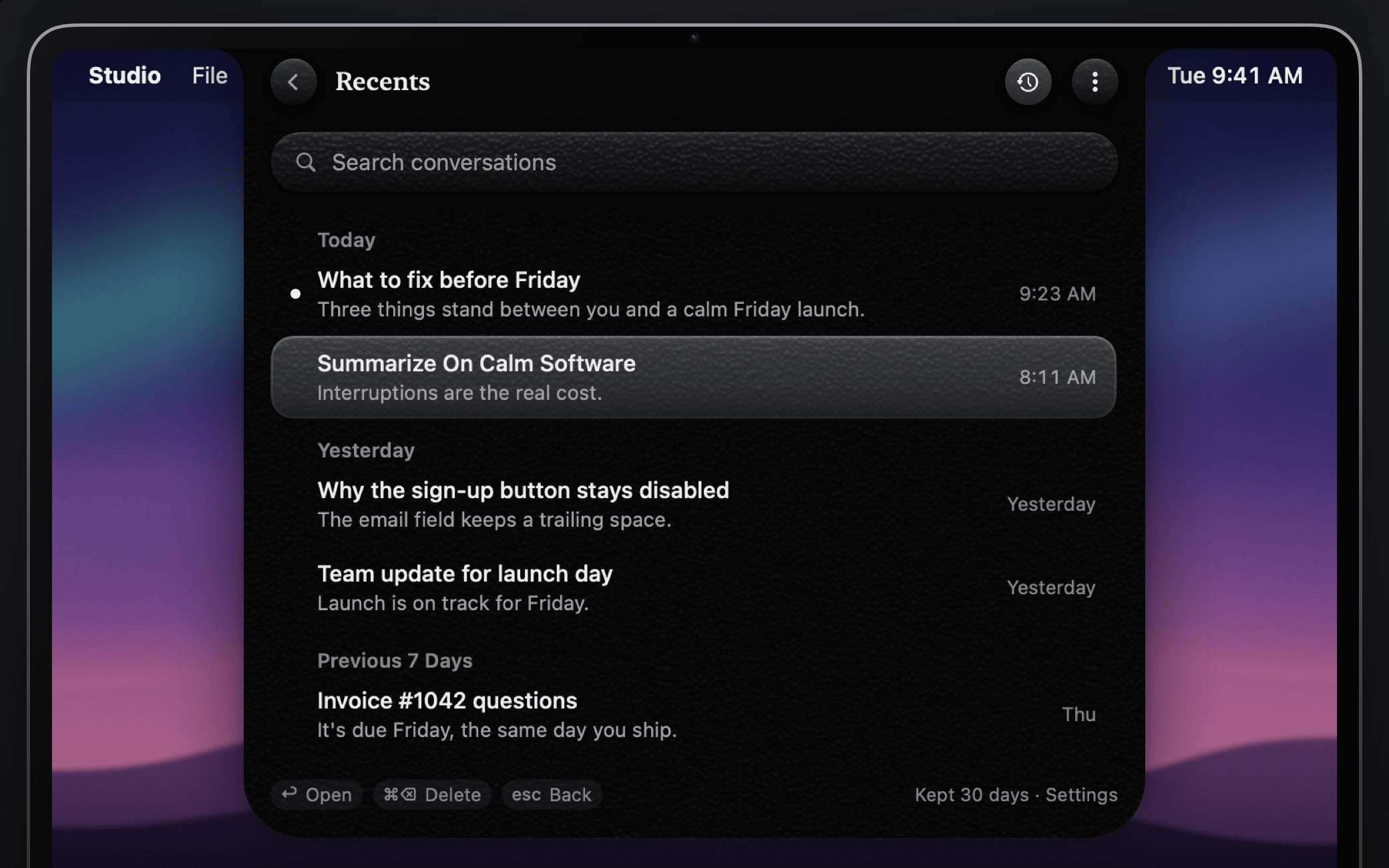
Recents under the notch: five past conversations grouped by day, with a search field

Picks up where you left off

Conversations are saved on your Mac, and ⌘Y opens Recents. Come back after 15 minutes away and Otto starts a fresh chat with a chip to continue the last one.

  • Kept for 30 days by default
  • Search, and undo a delete
  • Reopens where you were reading
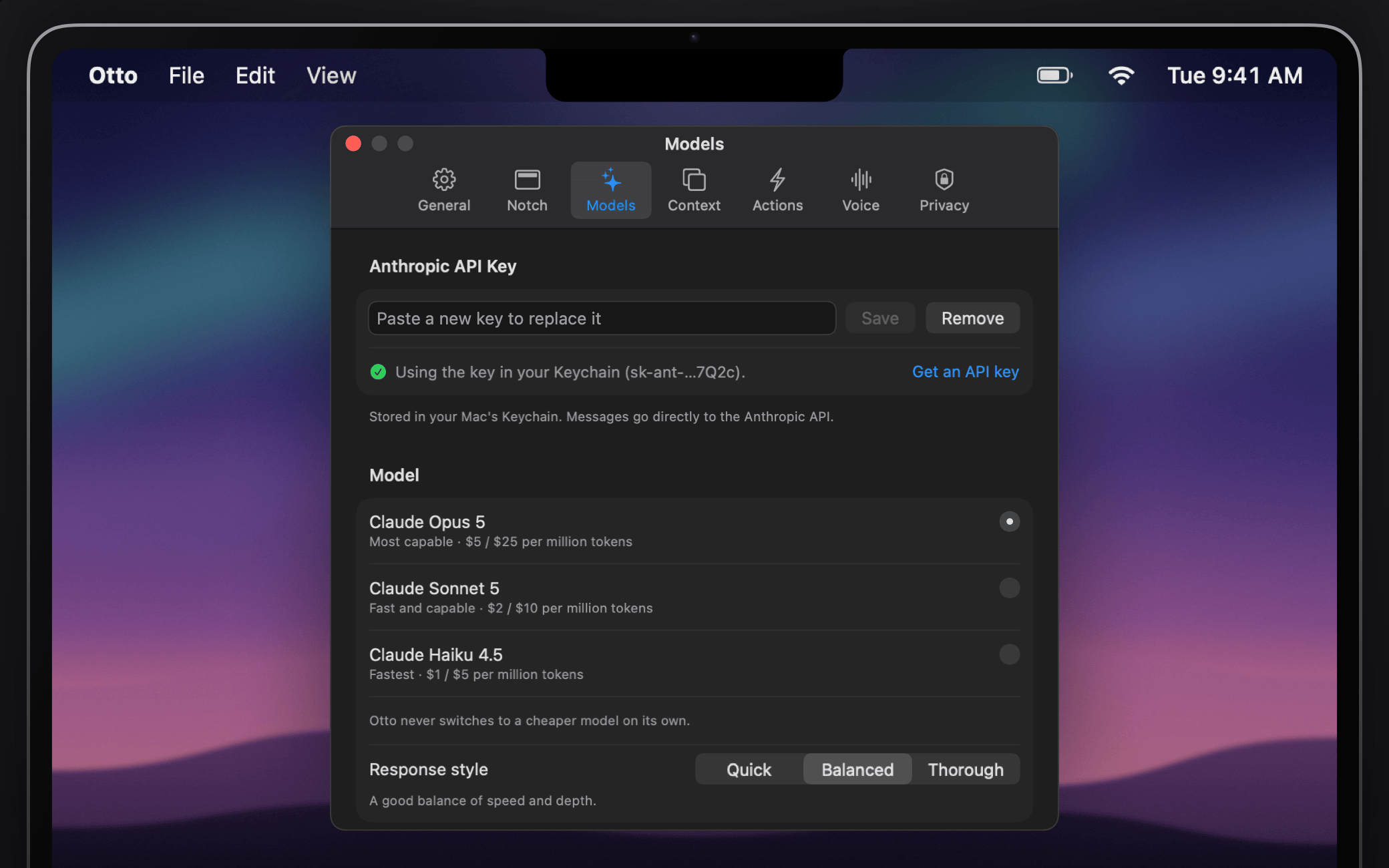
Otto Settings on the Models tab: the Anthropic API key saved in Keychain, the Claude models and the response style

Your key, your Mac

Bring your own Anthropic API key. It lives in your macOS Keychain, nothing leaves your Mac until you press send, and there's no account to create and no telemetry to opt out of.

  • API key stored in your login Keychain
  • No account, no analytics, no tracking in the app
  • Open source under the MIT license

How it works

Three steps from download to answer.

  1. Install Otto

    Download the trial, open the disk image and drag Otto to Applications. Prefer to build it yourself? The source is on GitHub.

  2. Add your API key

    Settings opens on first launch. Paste a key from the Anthropic Console and click Save. It goes straight into your Keychain.

  3. Hover and ask

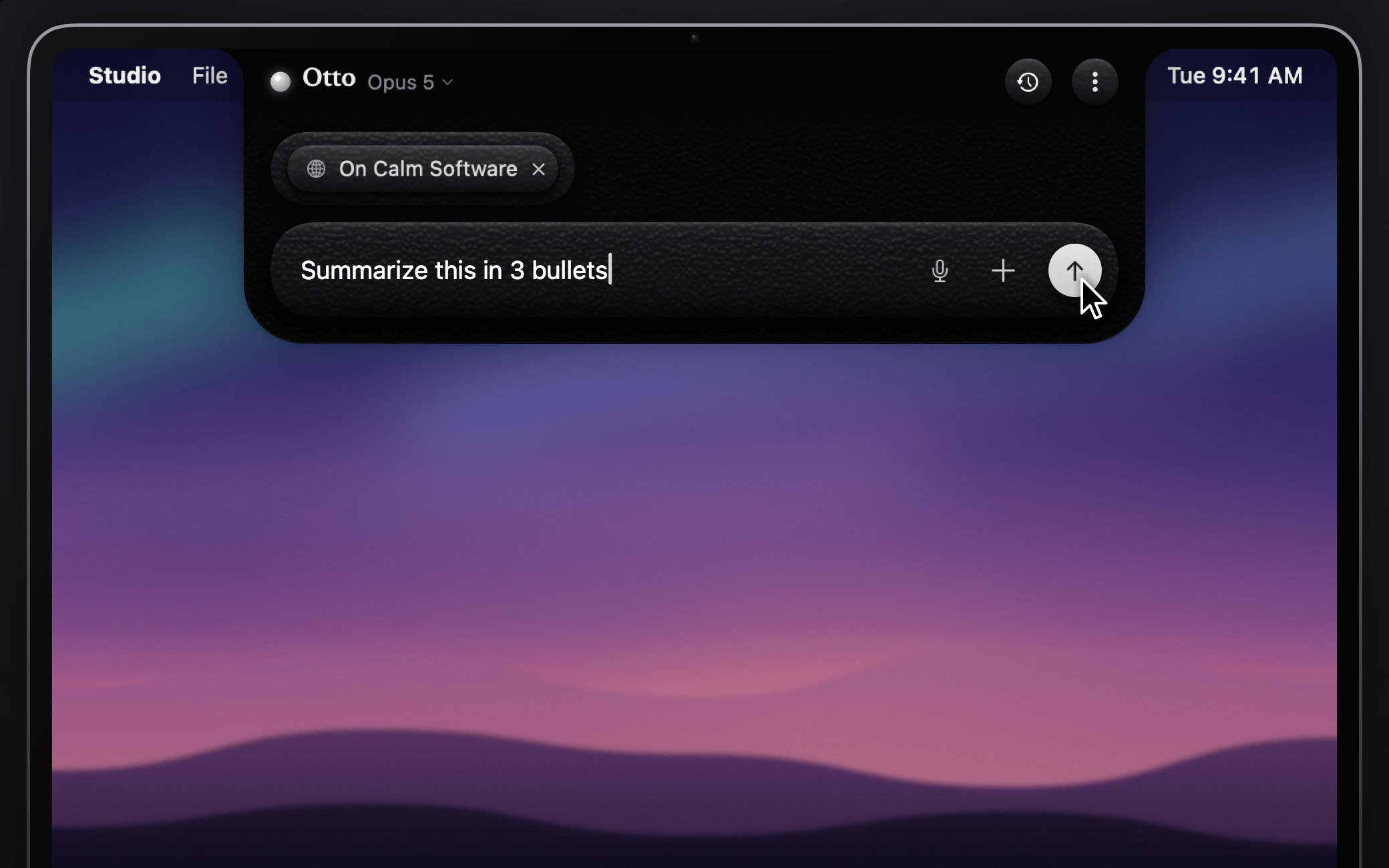
    Rest your pointer on the notch or press ⌥Space, type your question and press Return. That's it.

Otto open under the notch with a question typed into the composer, ready to send

$19 once, for up to 3 Macs.

Every 1.x update. 14-day trial, 30-day refund.

Privacy

You decide what leaves your Mac.

Otto has no servers of its own. It sends your messages to Anthropic when you ask, and the signed app checks its license with Polar and looks for updates here. Read the privacy policy.

Stays on your Mac

  • Your API key, in the login Keychain and nowhere else on disk
  • Your files, images and screenshots, until you press send
  • Your saved history, the Shelf and the actions log, in your user folder
  • Your settings
  • Everything about you: there's no account and no telemetry

Sent to Anthropic when you press send

  • Your message and the context chips you attached
  • Your custom instructions, the conversation so far and today's date
  • Web searches, which Anthropic runs for Claude while web access is on. You can turn it off in Settings.
  • With actions on, your time zone and local time, and what a tool reads or returns for Claude, such as your calendar events. Otto asks once before the first read.
  • Usage is billed to your own Anthropic account.

Otto asks for a permission only when a feature needs it. Automation, per browser, reads the front tab's title and address. Screen Recording is only for capturing a region or a window, and Accessibility only for pasting an answer into another app or offering your selected text. Voice needs Microphone and Speech Recognition, and calendar and reminder actions need Calendars and Reminders.

This website counts page views with Vercel Web Analytics. It sets no cookies. Vercel tells visitors apart by a hash of the request and discards each visitor session after 24 hours. The Otto app itself has no analytics.

FAQ

Questions, answered.

What does Otto cost?

The signed app is $19 once, for up to 3 Macs, with every 1.x update and a 14-day trial. The source code stays free under the MIT license. Either way, Anthropic bills your Claude usage to your own API account.

Where do I get the signed app?

Here. Download the trial, then buy a license on the pricing page. It's never on GitHub.

What do I need to run it?

A Mac running macOS 14 Sonoma or later and an Anthropic API key with credit. You can create a key in the Anthropic Console. A Claude.ai subscription is separate from API access and doesn't work here. To build from source you also need Xcode 16 or later.

Why isn't Otto on the Mac App Store?

Mac App Store apps must run in Apple's App Sandbox, and Otto's notch panel, global shortcut and browser tab reading are built to run outside it. The signed app is sold on this site instead.

My Mac doesn't have a notch. Can I still use Otto?

Yes. On Macs without a notch, and on external displays, Otto draws a virtual notch at the top center of the screen. Everything else works the same way.

Which Claude models can I use?

Pick Claude Opus 5, Sonnet 5 or Haiku 4.5 in Settings. You can also choose a response style, turn web search on or off, and add custom instructions.

Where is my API key stored?

In your macOS login Keychain. Otto never writes it anywhere else, and only sends it to Anthropic's API to authenticate your requests.

What permissions does Otto ask for?

Only what a feature needs, the first time you use it, and the notch explains each one before macOS asks. Automation access for each browser lets Otto read the current tab's title and address. Screen Recording is for capturing a region or a window, Accessibility for pasting answers into other apps or offering your selected text, and Microphone and Speech Recognition for Voice. The shortcut and hover detection work without any of them.

Can Otto change things on my Mac?

Only with actions on, and they're off until you turn them on in Settings. Adding an event or reminder, running a shortcut or script, and opening a link each show a card with exactly what will run and wait for your click or ⌘↩. Play, pause and skip run right away, reads ask once, and a shortcut you mark Always allow can skip its card. AppleScript has its own switch.

Another app already uses ⌥Space. What now?

You can turn Otto's shortcut off in Settings and open Otto by hovering or clicking the notch, or from the menu bar icon. Or change the shortcut in the other app.

How do I quit Otto?

Otto doesn't live in the Dock. Quit it from the menu bar icon or from the ⋮ menu inside the notch.

Can I build it from source?

Yes, and it costs nothing. The source build is a native Swift app with no third-party dependencies. Install XcodeGen with brew install xcodegen, clone the repository and run scripts/run.sh. The README has the details.

If you build it yourself and want to support the work, you can sponsor Otto on GitHub.

Is Otto made by Anthropic?

No. Otto is an independent open source project by Jalen Edusei. It uses the Claude API with your own key and is not affiliated with, endorsed by or sponsored by Anthropic.

Put Claude one hover away.

Try it for 14 days on macOS 14 or later.